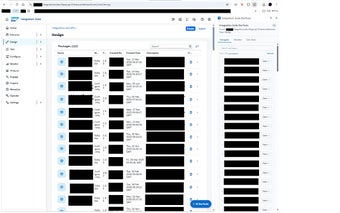
Chrome extension for in-context SAP Integration Suite development
Integration Suite DevTools from Integration Suite is a Chrome extension designed for developers and architects working inside SAP Integration Suite tenants. It embeds a browser side-panel that surfaces diagnostics, trace inspection, script testing, and payload comparison directly alongside the BTP cockpit. Key capabilities include an Artifact Navigator, Trace Viewer, Monaco-based payload diffing, and a draggable floating action button for quick access. The tool targets SAP integration developers and support engineers who need faster in-context debugging and navigation.
What the extension places inside the tenant page
The extension installs a dedicated side interface that appears while you are logged into your SAP tenant, so tools are available without switching tabs. It replaces internal ID ordering with A-Z sorting for artifacts and routes processing locally or against your configured backend, a design choice that explicitly avoids external data collection. Those design elements target reduced context switching and in-session visibility for development work.
How it exposes traces and payload differences for diagnostics
The Trace Viewer presents message processing logs and execution steps for stepwise inspection, while the Payload Viewer and Diff use the Monaco editor for syntax-highlighted comparisons. That combination lets developers compare incoming and outgoing payloads inline and inspect processing logs to locate failures or unexpected transformations during message flow execution.
Whether you can run and debug scripts without leaving the browser
The extension provides built-in script testers for Groovy and XSLT that execute inside the browser context, giving immediate feedback on transformations. A Designer Debug Panel shows real-time message log monitoring and a Log-Level Management helper lets you adjust logging for troubleshooting. A customizable floating action button provides rapid access to these utilities from the flow designer.
How it fits into browser and tenant workflows
The tool requires an active session on an Integration Suite tenant and runs on Chromium-based browsers such as Chrome, Edge, or Brave, so it integrates into existing BTP workflows without server-side components. Because processing happens locally or against your own backend, teams subject to strict data policies can keep payloads within their environment while working inside the cockpit.
A focused browser tool for developers who need in-session diagnostics
Integration Suite DevTools is a practical option for individual developers and support engineers who spend time working directly in tenant sessions and want diagnostics available inside the browser. The approach reduces the friction of hopping between tools, but it depends on each team member installing the extension and remains browser-scoped rather than serving as a centralized, server-side monitoring console.